Before you start
You need a receipt printer.
Steps6
- Open Business.
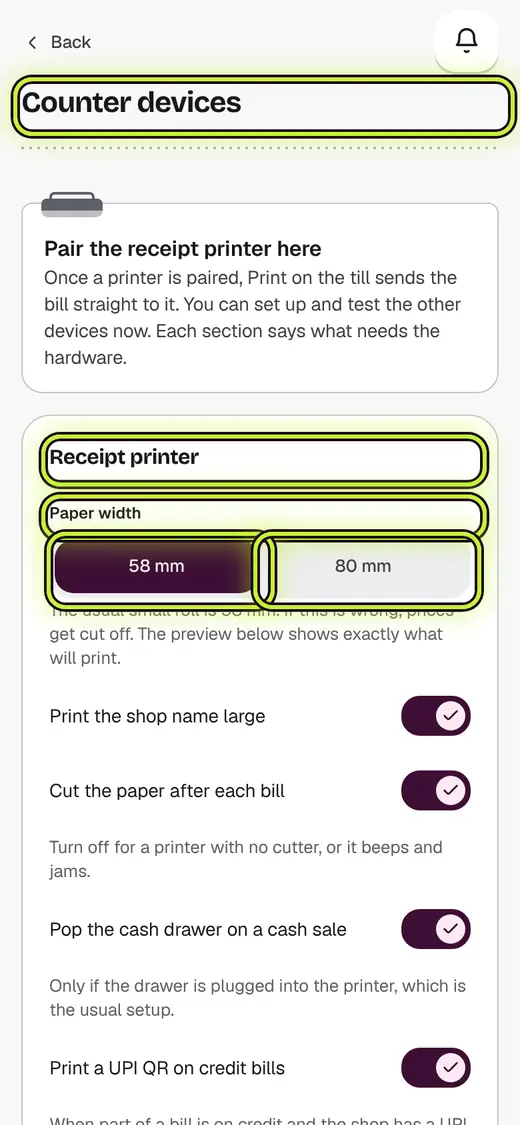
- Tap Counter devices.
- Under Receipt printer, tap Pair printer.
- Tap Find Bluetooth printers, or type the Printer IP address.
- Pick the Paper width, 58 mm or 80 mm.
- Tap Test print.
If it stops you
Prices cut off on the slip: the paper width is wrong. Change it.
Nothing came out: check the paper and that the printer is on.
Good to know
- The small roll is usually 58 mm.
Still stuck?
In the app, tap ? on the screen you are on and ask in your own words. Or email support@kowntx.com. A person replies in writing. Never send your PIN, code or card number.